Keyestudio MEGA 2560 R3 Board – ATmega2560 Development Board Compatible with Arduino Mega
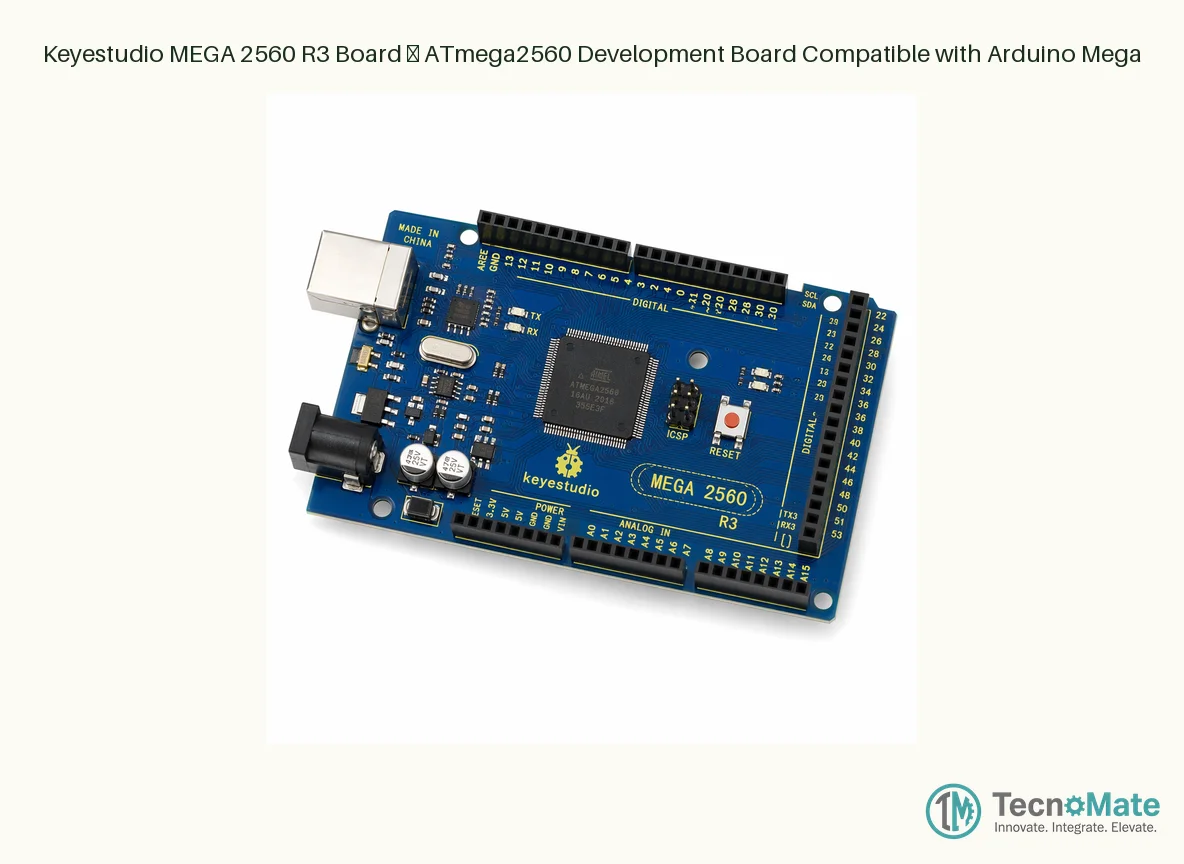
The Keyestudio MEGA 2560 R3 is a high-performance, fully compatible alternative to the official Arduino Mega 2560 R3, built around the powerful ATmega2560 microcontroller. Designed and manufactured by Keyestudio — a trusted name in the open-source hardware community — this board delivers the same robust functionality, pin layout, and shield compatibility as the original Mega 2560, but at a far more accessible price point for Indian students, hobbyists, and professional developers.
At the heart of the board is the ATmega2560 chip, clocked at 16 MHz, offering a massive 256 KB of flash memory (of which 8 KB is used by the bootloader), 8 KB of SRAM, and 4 KB of EEPROM. This gives you enormous headroom for large, complex sketches that would choke smaller Arduino boards. With 54 digital I/O pins (15 of which can be used as PWM outputs), 16 analog inputs, 4 hardware UART serial ports, an I2C bus, and an SPI interface, the MEGA 2560 R3 is the go-to choice for projects requiring multiple sensors, actuators, communication modules, and displays simultaneously.
The board features a USB Type-B port for programming and power, a DC barrel jack for external 7–12V power supply, an ICSP header for direct programming, and a reset button. The R3 revision includes the enhanced auto-reset circuit, SDA/SCL pins broken out near AREF, and the IOREF pin that allows shields to automatically adapt voltage levels — making it fully compatible with the vast ecosystem of Arduino Mega shields available in the Indian market.
Whether you are building a 3D printer controller, a home automation hub, a robotic arm with inverse kinematics, a multi-sensor weather station, or an IoT data logger with multiple communication channels, the Keyestudio MEGA 2560 R3 gives you the pin count, memory, and processing power to bring ambitious projects to life without breaking the bank. It works seamlessly with the Arduino IDE, PlatformIO, and Visual Micro, and is supported by the full Arduino ecosystem of libraries and community resources.
Every Keyestudio MEGA 2560 R3 board undergoes rigorous factory testing before shipping, ensuring you receive a reliable, ready-to-use board. The PCB is high-quality with clean soldering, clear silkscreen labels, and gold-plated headers for excellent conductivity and corrosion resistance — exactly what you need for long-term project deployments in India's humid climate.
₹1155.00
Specifications
I2C: SDA (pin 20), SCL (pin 21)
SPI: MISO (50), MOSI (51), SCK (52), SS (53)
SRAM: 8 KB
EEPROM: 4 KB
Weight: ~37 g
Bootloader: Arduino Mega 2560 compatible
Flash Memory: 256 KB (8 KB used by bootloader)
USB Connector: USB Type-B
USB-to-Serial: ATmega16U2
PCB Dimensions: 101.52 x 53.3 mm
Microcontroller: ATmega2560 (genuine, 16 MHz)
Digital I/O Pins: 54 (15 PWM-capable)
Analog Input Pins: 16
Operating Voltage: 5V
Input Voltage (limit): 6–20V DC
DC Current per I/O Pin: 20 mA
DC Current for 3.3V Pin: 50 mA
Hardware UART Serial Ports: 4
Input Voltage (recommended): 7–12V DC
Details
The Keyestudio MEGA 2560 R3 is one of the most popular Arduino Mega compatible boards in the Indian maker and education market. Here's why it matters and what to consider before buying.
**Why Choose the MEGA 2560 Over an Arduino Uno?**
The Arduino Uno R3 is fantastic for beginners and simple projects, but it has limitations: only 32 KB of flash, 2 KB of SRAM, 14 digital pins, and 6 analog inputs. The MEGA 2560 R3 blows past those limits with 256 KB flash, 8 KB SRAM, 54 digital pins, and 16 analog inputs. If your project involves an LCD screen, multiple sensors, a motor driver, and a wireless module all at once, the Uno will run out of pins and memory fast. The MEGA 2560 handles it comfortably. This makes it the standard choice for 3D printer control boards (Marlin firmware), CNC machines, advanced robotics, and multi-sensor data-logging applications.
**Keyestudio Quality vs. Official Arduino**
Keyestudio has established itself as one of the most reputable manufacturers of Arduino-compatible boards worldwide. Their MEGA 2560 R3 uses genuine ATmega2560 chips (not remarked or recycled ICs), quality PCB material with immersion gold finish, and proper voltage regulators. Unlike many no-name clones that cut corners on the USB-to-serial converter (using unstable CH340G chips with driver headaches), Keyestudio uses the ATmega16U2 for USB communication — the same chip used on official Arduino boards — ensuring rock-solid serial communication and easy driver installation on Windows, Mac, and Linux.
**What's Included When You Buy**
The standard Keyestudio MEGA 2560 R3 comes as a bare board with the ATmega2560 and ATmega16U2 pre-programmed with the bootloader. It typically ships in an anti-static bag. Unlike some starter kits, this is the board only — no USB cable, no components, no manual. You will need a USB Type-A to Type-B cable (commonly called a USB printer cable) to connect it to your computer. Many Indian retailers sell this cable separately for around ₹80-150. The board works right out of the box; just select "Arduino Mega or Mega 2560" in the Arduino IDE Tools menu, pick your COM port, and you are ready to upload.
**Power Options and Considerations**
The board can be powered via USB (5V) or via the DC barrel jack (recommended 7–12V). The onboard voltage regulator handles up to 20V, but supplying more than 12V causes the regulator to dissipate significant heat and can eventually damage it. If you are powering servos or motors, connect them to an external supply and only use the board for logic — drawing motor current through the board's 5V regulator is a common cause of failure.
**Software Setup in 3 Steps**
1. Download and install Arduino IDE from arduino.cc.
2. Connect the Keyestudio MEGA 2560 R3 via USB cable; Windows will detect it automatically (ATmega16U2 uses standard drivers).
3. In Arduino IDE: Tools → Board → Arduino Mega or Mega 2560, select the COM port, and hit upload on the Blink example.
**Projects the MEGA 2560 Excels At**
- **3D Printer Controller:** Runs Marlin firmware; all popular DIY 3D printer kits use the Mega 2560 + RAMPS 1.4 combination.
- **Home Automation Hub:** 4 hardware serial ports allow simultaneous communication with GSM, GPS, Bluetooth, and Wi-Fi modules without software serial overhead.
- **Multi-Channel Data Logger:** 16 analog inputs let you read an array of sensors (temperature, humidity, light, soil moisture, gas sensors, etc.) and log to an SD card.
- **Robotic Arm Controller:** Compute inverse kinematics while reading multiple encoders and driving several servo/PWM channels.
- **LED Matrix or Cube:** Drive large LED arrays with plenty of PWM-capable pins and memory for frame buffers.
**Common Troubleshooting Tips**
- **"avrdude: stk500_getsync(): not in sync"** — Check that the correct board and COM port are selected. Press reset just before upload if you are using an older bootloader.
- **Board not detected** — The ATmega16U2 uses standard CDC drivers included in all modern OSes. On very old Windows 7 machines, you may need to install Arduino drivers from the IDE installation folder.
- **Upload succeeds but nothing happens** — Make sure your code does not immediately overwrite serial or uses pins reserved for internal functions.
The Keyestudio MEGA 2560 R3 is truly a workhorse board that belongs in every serious maker's toolbox. Its generous specifications and rock-solid compatibility make it a one-time investment that grows with your skills from intermediate projects all the way to advanced, professional-grade prototypes.


 Arduino Boards & Compatibles